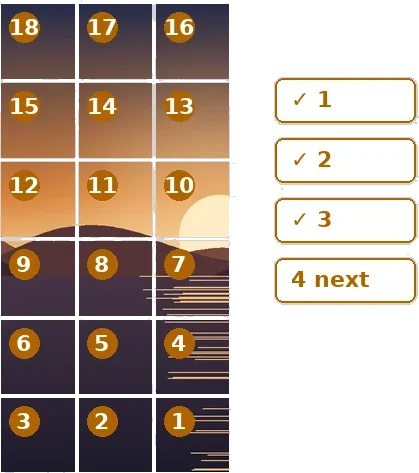
A grid you post over days
A three-by-three grid goes up in an afternoon. A puzzle feed does not: eighteen or thirty-six posts are usually spread over days so followers are not flooded, and somewhere in the middle of that the question becomes which tile is next. The tiles look alike at thumbnail size, the order runs backwards, and a phone camera roll sorts them by date rather than by number. This route opens the profile grid six rows deep and adds the piece that makes long grids workable: a posting ledger.
The ledger is a small copy of the grid made of buttons, each carrying its upload number. Tick a tile when it goes up and the next one is marked, by number and by its row and column. If you posted from another phone, type the count into “I have posted” and the ledger catches up. A different grid gets a different ledger, and if you change the grid while a ledger has ticks in it, the board tells you rather than quietly moving your ticks onto tiles they were never meant for.
A worked example
3240 × 8640 → 18 files · columns 1080 + 1080 + 1080 = 3240 px · rows 1440 + 1440 + 1440 + 1440 + 1440 + 1440 = 8640 px
| Upload | Cell | From x, y | Pixels |
|---|---|---|---|
| 1. mural-r6c3.png | row 6 · col 3 | 2160, 7200 | 1152 × 1440 upload (1080 × 1440 shown) |
| 2. mural-r6c2.png | row 6 · col 2 | 1080, 7200 | 1152 × 1440 upload (1080 × 1440 shown) |
| 3. mural-r6c1.png | row 6 · col 1 | 0, 7200 | 1152 × 1440 upload (1080 × 1440 shown) |
| 4. mural-r5c3.png | row 5 · col 3 | 2160, 5760 | 1152 × 1440 upload (1080 × 1440 shown) |
| 5. mural-r5c2.png | row 5 · col 2 | 1080, 5760 | 1152 × 1440 upload (1080 × 1440 shown) |
| 6. mural-r5c1.png | row 5 · col 1 | 0, 5760 | 1152 × 1440 upload (1080 × 1440 shown) |
| 7. mural-r4c3.png | row 4 · col 3 | 2160, 4320 | 1152 × 1440 upload (1080 × 1440 shown) |
| 8. mural-r4c2.png | row 4 · col 2 | 1080, 4320 | 1152 × 1440 upload (1080 × 1440 shown) |
| 9. mural-r4c1.png | row 4 · col 1 | 0, 4320 | 1152 × 1440 upload (1080 × 1440 shown) |
| 10. mural-r3c3.png | row 3 · col 3 | 2160, 2880 | 1152 × 1440 upload (1080 × 1440 shown) |
| 11. mural-r3c2.png | row 3 · col 2 | 1080, 2880 | 1152 × 1440 upload (1080 × 1440 shown) |
| 12. mural-r3c1.png | row 3 · col 1 | 0, 2880 | 1152 × 1440 upload (1080 × 1440 shown) |
Designing for many rows
The visible part of each post is the centre 3:4 of a 4:5 upload, so a design for a 3 × 6 grid wants an overall shape of 9 by 24 — tall and narrow. A picture of another shape is framed: crop to fit takes the largest 9:24 window and lets you drag it, pad to fit adds bars or a blurred extension. Each upload carries about 33 pixels of hidden picture at either side; with Neighbour pixels those strips hold the real picture next to the tile, so a post opened on its own looks natural instead of showing bars.
Width matters more on long grids, because the source is divided three ways. For every upload to be a full 1080 pixels wide, the framed picture needs to be about 3040 pixels across; the board warns when it is narrower and says how wide it would need to be.
Posting order is how the platform behaves today, not a rule of arithmetic. If the profile ever fills in a different direction the numbers change and the tiles stay correct. Instagram also re-encodes every upload, so faint seams can appear between tiles however exact the cut.
How to do it here
- Open the design. Drop the picture; the board opens on a 3 × 6 profile grid.
- Set the rows. Use the Rows control (1 to 12) and frame the picture under Framing.
- Cut. Write the ZIP; posting-order.txt lists every upload with a box to tick.
- Post and tick. Upload the tile marked next, then tick it in the ledger. 'I have posted' jumps straight to your place.


