Three questions, one set of sums
Before printing a poster across sheets, three numbers decide whether it is worth doing: how big the finished poster will be, how big the picture can honestly print, and how many sheets that takes. The calculator above answers each with the same arithmetic the board uses to lay out real sheets, so a number here is the number the board prints when you open the picture. There is no second set of sums anywhere on the site.
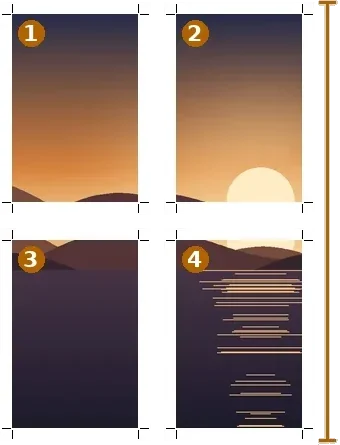
Finished size is not simply sheets times paper size. A home printer cannot print to the edge, so every sheet loses a margin on all four sides, and neighbouring sheets overlap so they can be taped. With the defaults, four A4 sheets make 37.8 × 55.2 cm · 14.9 × 21.7 in — the margin and overlap are why that is short of A2.
Worked examples
A 4000 × 3000 photo prints at 33.9 × 25.4 cm · 13.3 × 10.0 in at 300 DPI, and at 67.7 × 50.8 cm · 26.7 × 20.0 in at 150. A 60 × 90 cm poster takes 4 × 4 = 16 A4 sheets or 3 × 3 = 9 A3 sheets in portrait, making a finished poster of at least that size; the picture is framed to the sheets and the rest trimmed.
What the DPI number means
DPI here is effective density: the picture’s pixels divided by the printed inches. It is the number that decides how sharp the print looks. The DPI written in a file’s header is only a label telling a print dialog what size to use; changing it adds nothing. That is why the calculator never asks what DPI the file “has” — only how many pixels it has and how large you want it.
Printer margins differ. 8 mm is a safe default for most home inkjet and laser printers; check your printer’s printable area and type its margin for an exact answer.
How to do it here
- Sheets to size. Pick paper, orientation, sheets across and down, margin and overlap; the finished size prints in cm and inches.
- Pixels to print. Type the picture's pixels, or read them from a file; the table shows its size at 300, 200 and 150 DPI.
- Size to sheets. Type the finished size you want; each paper's sheet count and the DPI you would reach are listed.
- Lay it out. Open the picture on the board below to print it across those sheets.


