One sheet, four upload files
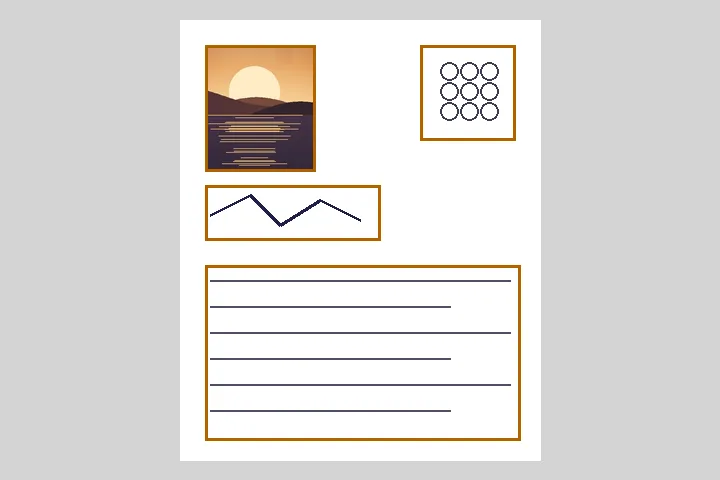
Many Indian recruitment and exam applications ask for four separate uploads — a photograph, a signature, a left thumb impression and a handwritten declaration — each with its own pixel size and file-size window. The simplest way to produce them is to put all four on one sheet of paper and scan it once. This page turns that one scan into the four files: it finds the inked regions, lets you correct the boxes, and makes each file at the size the notice asks for.
Photo and thumb are cropped to the file’s shape from the middle of their box. Signature and declaration are never cropped — losing the end of a signature is worse than a white margin — so they are fitted inside the file on white. Then each file is compressed by searching the JPEG quality until it lands inside the KB window, and the DPI is written into the header where the notice states one.
The presets and where they come from
| Preset | Photo | Signature | Left thumb | Declaration |
|---|---|---|---|---|
| Bank recruitment (IBPS-format notice) primary source, checked 2026-10-18 | 200 × 230 px, 20–50 KB | 140 × 60 px, 10–20 KB | 240 × 240 px, 20–50 KB, 200 DPI | 800 × 400 px, 50–100 KB, 200 DPI |
| SSC signature (commonly cited) commonly cited — confirm on the official portal, checked 2026-10-18 | — | own pixels, 10–20 KB | — | — |
| UPSC photo and signature (commonly cited) commonly cited — confirm on the official portal, checked 2026-10-18 | 350 × 350 px, 20–300 KB | 350 × 150 px, 20–100 KB | — | — |
Sources: Punjab & Sind Bank recruitment notice, October 2024 · Secondary source: SSC CGL signature upload rules as published by a coaching site · Secondary source: UPSC photograph and signature specifications as summarised by a study site. Aadhaar and PAN have no user-upload specification we could source, so there is no preset for either.
Scanning the sheet
Use plain white paper, a dark pen for the signature and declaration, and keep each part well apart. Scan at 200 or 300 DPI in colour; a phone photo works if it is taken straight on in even light. The boxes are placed by looking for dark ink: the most solid portrait-shaped region is taken as the photo, the most solid squarish one as the thumb, a wide light region as the signature and the largest wide block as the declaration. Check them — the detector is simple on purpose, and every box can be moved.
Notices change, and the authority’s own notice always wins. Every number here is editable; check each one against the notice for the post you are applying to before uploading.
How to do it here
- Scan the sheet. Scan the A4 sheet holding your photo, signature, thumb impression and declaration, or photograph it straight on.
- Check the boxes. Four boxes are placed on the inked regions; drag or type to adjust any of them.
- Pick the preset. Bank (IBPS format), SSC signature, UPSC, or Custom — then check every number against your notice.
- Make the files. Each part is cropped or padded, resized, and compressed into its KB window; save each or the ZIP with a receipt.


